
E-Commerce
PrestaShop upgrade to version 9: from 1.6, 1.7 and 8
A PrestaShop store upgrade that starts with an audit of modules, theme, overrides and server. The scope depends on the version the store starts from: moving from 8 to 9 looks different from moving from 1.7, and with 1.6 a new store with the data carried over is usually the better route.
What this covers: PrestaShop upgrade
Why upgrade PrestaShop
Every PrestaShop release brings security fixes and new features, and older versions eventually stop receiving them. A store stuck on an old release also runs on an ageing PHP version that hosting providers drop over time, and new payment modules or integrations are often built only for current versions of the platform.
BeGiga upgrades PrestaShop stores to version 9 from 8, 1.7 and 1.6, covering the installation audit, getting modules and theme ready, switching the store over and support after launch.
Why an upgrade takes more than one click
PrestaShop has an official Update Assistant module, the successor to 1-Click Upgrade, which raises the store version from the back office. It works well when the installation stays close to the standard. A store developed over several years, by different agencies and with features built on the owner's request, rarely does. It has third-party modules, overrides, a reworked theme, integrations with wholesalers and payment providers, and a server running a PHP version chosen for an older release. Each of these needs a counterpart that works with the new version. Otherwise the upgrade stops halfway, or ends with a store that loads but doesn't process orders correctly and carries hidden errors, some of which only surface at the next upgrade.
A failed upgrade usually looks the same: the process breaks off halfway, and instead of the store there's a blank page, a 500 error or a PHP error message like the one below.
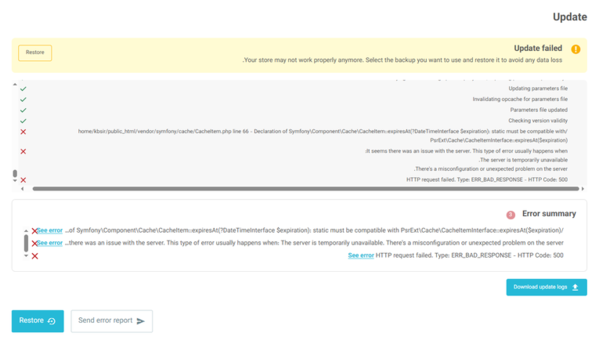
Diagnosing an error like this takes technical knowledge. When someone without development experience tries to fix it on the live store, with no backup, the store can stay offline for several days. Failed attempts to restore the previous version can also end in lost orders or customer data.
Installation audit before the upgrade
BeGiga starts with a quick installation audit: the exact PrestaShop and PHP versions, the modules in use and whether they have versions compatible with the target release, core overrides, theme changes, integrations and the state of the database. From that we choose the route (an in-place upgrade, a staged upgrade or a fresh install with data migration) and list what needs replacing.
For older or heavily customised stores we also recommend a wider look at the code, performance and security, which is what our e-commerce audit covers.
PrestaShop upgrade from version 8 to 9
Going from 8 to 9 is the shortest road to the latest version, and still a big change. PrestaShop 9 runs on Symfony 6.4 and needs at least PHP 8.1, and some modules and themes built for version 8 have to be updated. Payment, shipping and invoicing modules, wholesaler and ERP integrations, and anything that touches checkout need the most attention.
A version 8 store that already runs on PHP 8.1 is a good sign: that's the highest PHP version 8 supports and the minimum for PrestaShop 9. A store still on PHP 7.4 can hide problems that only surface once PHP changes, in custom modules, modules left behind by earlier agencies, and themes. When a store's modules all have compatible versions, it usually goes through an in-place upgrade, on a copy first and then on production.
PrestaShop upgrade from version 1.7 to 9
For years 1.7 was the most widely used PrestaShop release, and many stores still run it, often after rework by several developers. The jump from 1.7 to 9 spans several generations of change: a different Symfony version, new PHP requirements, changed hooks and a different way modules work. There are two routes. A staged upgrade with a stop at 8.2 lets the store settle after the first jump and the modules be checked before the next. A fresh PrestaShop 9 install with data migration is often simpler when the store has many overrides and modules their authors no longer support. The installation audit decides which one.
A store on PrestaShop 1.6
Stores on 1.6 run on an architecture that newer versions no longer resemble: a different theme system, different modules, old PHP. An in-place upgrade to version 9 is practically out of the question. The sensible route is a new store on PrestaShop 9, with products, categories, customers, order history and content moved over and redirects for any URLs that change. Technically this is closer to moving house than to an upgrade, so it runs like a migration to PrestaShop.
Minor upgrades: 8.2.1 to 8.2.3, or 9.1 to 9.2
Upgrades within the same major version don't need this much preparation. For these BeGiga uses a shorter route: a backup, a check of the modules for known incompatibilities, and the upgrade itself, without a separate test environment. These releases are worth installing as they come. PrestaShop 9.2, for example, added an AI assistant in the back office, an MCP server and one-page checkout, covered in PrestaShop 9.2: the AI assistant and planning an upgrade.
Modules, theme and overrides
When a module has no PrestaShop 9 compatible version, there are three options: an update to a new release from its author, a replacement module, or changes to its code. Custom modules and leftovers from previous agencies are adapted to the new version wherever possible. The theme has to be checked for the templates, scripts and hooks it relies on. Off-the-shelf themes often have separate PrestaShop 9 releases, while themes reworked over the years need their changes carried over.
This is also a good moment to consider Hummingbird, the new PrestaShop theme. Switching themes amounts to rebuilding the storefront, but it pays off when the upgrade is a chance to clear out old dependencies and unused modules, which makes the store easier to maintain and develop later. Core overrides are carried over only when a hook or a module can't replace them.
Switch-over and support after the upgrade
We switch production over on an agreed date, during the hours of lowest traffic, after taking backups. They let the store return to its previous state if something still goes wrong despite testing on the staging copy.
Problems that show up after an upgrade usually come from the theme and modules behaving differently in the new version: a bug in a single hook can hide the cart button or stop orders from reaching the warehouse. So after launch we watch the error logs and the orders going out to integrations. Ongoing technical support under the PrestaShop stores service keeps the platform and modules on regular security updates, instead of one big jump every few years.
How a PrestaShop upgrade runs
- Installation audit. A quick review of the PrestaShop and PHP versions, modules, theme, overrides and integrations, leading to an assessment and a recommended route: in-place, staged or a fresh install.
- Plan and quote. The modules to update, replace or modify, the scope of theme changes and the risks known before work begins.
- Upgrade on a copy. For major-version upgrades, in most cases the upgrade or migration runs on a copy of the store, with fixes and purchase path testing together with the client's team.
- Switch-over and support. Production upgrade on an agreed date during the hours of lowest traffic, post-launch checks and an optional maintenance agreement.
FAQ: PrestaShop upgrade
Will I lose store data during the upgrade?
Products, customers, orders, categories and settings move together with the database in an in-place upgrade, or are transferred to the new installation in a migration. A backup of the store and database is made before every stage, and the work runs on a copy, so the production store stays untouched until the switch-over.
Will the store keep running during the upgrade?
Not the whole time. In most cases the upgrade and testing happen on a copy of the store, so it keeps selling through most of the work. It goes offline only while production is upgraded or, in a migration, switched over to the new installation. That happens after the new version has been checked, on an agreed date, ideally during the hours of lowest traffic. In a migration, the final data sync includes orders placed while the work was underway.
Will the upgrade affect the store's Google rankings?
No. An upgrade on its own doesn't change URLs. The exceptions are rare: overrides or modules that change how URLs are built (for example by removing IDs from them), or bigger changes such as moving to multistore. We check for this before the upgrade, and any differences are covered by a set of redirects.
What happens to modules without a PrestaShop 9 compatible version?
Each one goes into one of three groups: an update to a new release from the module's author, replacement with another module that does the same job, or changes to the module's code made by a developer. Modules the store no longer uses aren't carried over.
When is a fresh install better than an upgrade?
When the store has many core overrides, modules abandoned by their authors, a theme reworked by successive developers, or runs on PrestaShop 1.6 (1.6.0 or 1.6.1). A fresh install with data migration then keeps the data and URLs.