
A private AI document archive: why Paperless-ngx comes before company AI
A private AI document archive starts with organised files. How Paperless-ngx sorts email and scans, keeps data on your server and prepares it for RAG.
Using AI appeals to plenty of companies: locating information more quickly, producing reports, replying to customer enquiries. AI requires data it can reach for any of that to succeed. In plenty of companies, though, certain documents continue to exist only on paper or as loose files, and a big portion never arrives in one organised location.
A private company document archive is therefore frequently the first step towards private AI. An internal knowledge base, together with the AI tools that draw on it, can be constructed only on top of it.
Open document management systems
Paperless-ngx, a well-known open-source system for managing and archiving documents, is one instance of such an archive. Other open tools of this kind follow the same principles, among them Mayan EDMS, an extensive system with document workflows intended for larger organisations.
Documents in large companies are typically handled by software tied to ERP and CRM systems such as SAP, Comarch, Asseco or Salesforce, and by office and identity platforms such as Microsoft 365 with Entra ID (formerly Azure Active Directory) or Google Workspace. Heavy dependence on the vendor is the drawback: changes and integrations require their cooperation and are constrained by their limits. Against that background Paperless-ngx stands out for how simple it is day to day and for its large community, which makes it a good starting point for a small company.
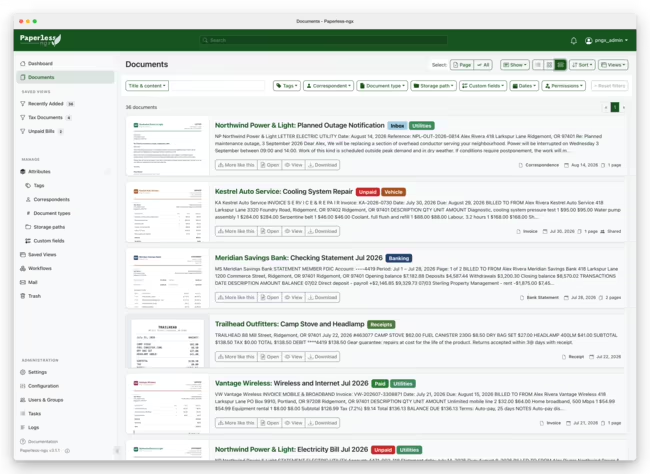
Why AI and an internal knowledge base start with documents
Accounting and billing, even in the smallest companies, usually already live in accounting systems. Supporting documents are what digitisation most often leaves out: reports, summaries, working sheets, notes and field protocols. Filing them is something nobody has time for, and they get hunted down only when needed. A large part of the company's knowledge that AI could use is held in them, however.
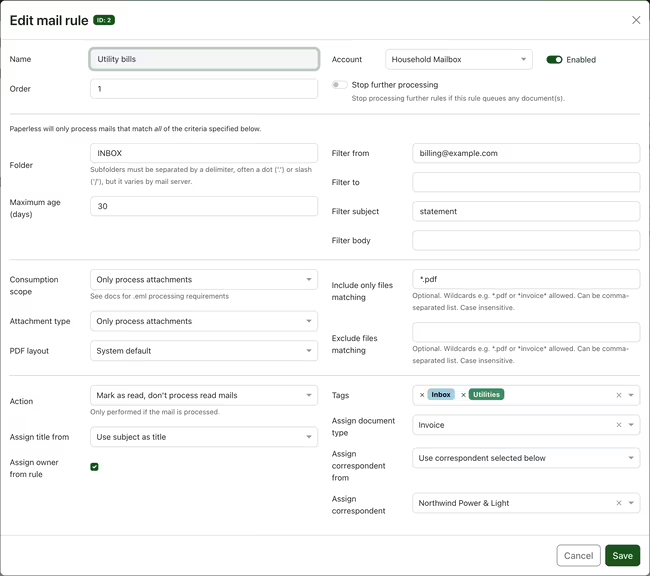
Email illustrates an unorganised knowledge source well. The history of work with business partners, the successes and the difficulties, is held there, yet almost nobody sorts every message and attachment by hand, particularly when attachments include signature icons and duplicates of the same files. An archive is able to do it: fetch attachments, skip what isn't needed and file the rest in the right categories. Privacy is affected by this too. Automatic email sorting in external services is avoided by many companies because they don't know where the data is processed, and handing correspondence to an outside tool can risk leaking partners' data.
What a document archive can be used for
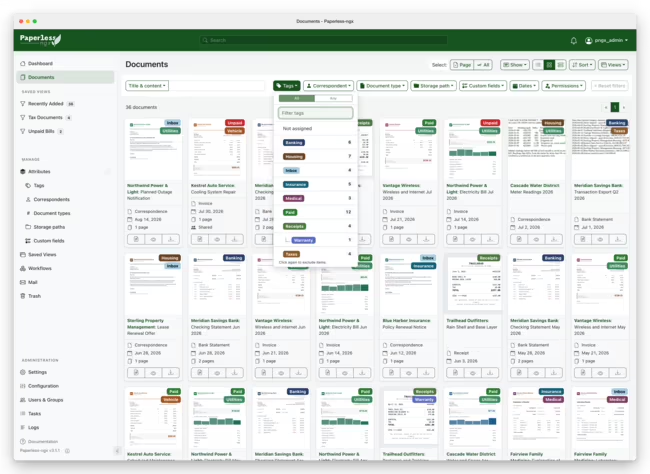
Text recognition (OCR) processes every document, scanned or digital, so it can be found by any word in its content. Handwriting is recognised less reliably than print, although combining the archive with AI models improves results. A document type, correspondent and tags are assigned by the system, which learns from how documents were described before, and extensions built on language models can also suggest a title, storage path and dates. Automatic tagging ranks among the biggest advantages of such an archive, because over time most documents get described without human input.
Paper copies are organised with the archive's help as well. A barcode or QR code can serve as an archive number for each physical document, read by the system during scanning, so which binder holds the original becomes clear.
Setting your own goals from the start is worthwhile: which documents go into the archive, how they'll be searched, who will use them and for what. A standard installation is only a starting point. Revisiting the settings after a few weeks of use pays off, refining the rules and adapting the archive to how the company actually works.
Privacy and GDPR
Private and confidential data is what a document archive is meant for, so where it runs matters a great deal. Files can be kept on a private network, on a computer or server in the company, with outside access through a tunnel. Should convenience matter more, the archive can run on a private VPS with a private network. Either way the files aren't publicly accessible, and storage and access can be matched to the GDPR requirements that apply to the company.
One thing to know here: Paperless-ngx stores files without application-level encryption. Encryption is provided one layer down, through an encrypted disk or volume, encrypted backups kept off the server and restricted access to the machine itself. This is the stage where a single oversight, such as an unencrypted copy on an external drive, cancels out every other safeguard, so it is best handled by someone who knows both Paperless-ngx and server administration. When extensive permissions or approval workflows are the priority, the technology has to be chosen with that in mind. BeGiga delivers such implementations, including hardware and local AI models, as part of its document archive and AI service.
How many users and which permissions
Before going live, decide how many people will use the archive and who should see which documents. Systems differ in how far this goes. Paperless-ngx offers a basic model: each document has an owner, and view or edit rights can be granted to selected users and groups. The default configuration suits a single user best. In a team without thought-through permissions things get messy fast, and documents imported without an owner may be visible to everyone.
When another system fits better
How a company works, or the software it already uses, doesn't always suit a general-purpose archive. Companies running SAP, extensive ERP and CRM systems, a Microsoft environment with SharePoint and Entra ID, or Salesforce have their own document modules there, and building on what already works is often better, since integrating yet another system with many existing ones can be hard and expensive. Open-source tools, on the other hand, are flexible: they can be modified, extended and adapted to the company.
Self-hosted open-source archives work best in companies that aren't loaded with such software, such as service offices and small trading and manufacturing businesses. The exact line depends on the organisation, but the purpose should always be clear. Paperless-ngx can share a single document by link, and if the archive sits behind a reverse proxy with its own login, the link only becomes public once an exception is added in that layer, which calls for caution. The tool isn't suited to public document exchange. It stores files without application-level encryption, so it is best treated as an archive on a local network, or as part of building a document collection for future language model projects.
Should needs go beyond what such a tool can do, looking at what the company's ERP vendor offers or at enterprise-grade open-source options such as Mayan EDMS is the better move.
Paperless-ngx vs DocuWare, M-Files, Filedoc and Mayan EDMS
Conversations about organising documents usually bring up commercial DMS platforms such as DocuWare, M-Files or Filedoc next to Paperless-ngx, along with the open-source Mayan EDMS. All of them store documents, but they were built for different jobs. Commercial platforms carry a document through its whole life in the organisation: approvals, versions, electronic signatures, ERP integrations and audit requirements, under a licence agreement with vendor support. Paperless-ngx does less. It collects documents from email, scanners and folders, recognises the text, describes the documents and exposes them through an API, while the files stay on disk in a readable structure.
That last point carries real weight in AI projects. An archive with tags, document types and correspondents is a ready dataset: documents already have OCR text and metadata, which a RAG system uses to filter results, for instance to narrow an answer down to one partner's contracts. On such a dataset you build LangChain pipelines, AI agents in LangGraph that search the archive, compare documents and prepare summaries, and evaluation that checks whether answers rest on the right documents. Paperless-ngx then becomes the data layer for AI tools, and the decision about a document workflow system can come later, once it is clear whether the company needs approvals and signatures or, above all, access to the knowledge held in its documents.
| System | Main use | Approval workflows | Deployment model | Role in AI projects |
|---|---|---|---|---|
| Paperless-ngx | Archive: OCR, automatic tagging, search | No, only rules for automatic tagging | Open source, own server or VPS | Source of text and metadata for RAG and agents, API access |
| Mayan EDMS | Archive with document workflows and extensive permissions | Yes | Open source, own server | Data source, needs more configuration |
| DocuWare | Document and process management across a company | Yes | Commercial, cloud or on-premises | Vendor AI features within the platform |
| M-Files | Metadata-driven document management | Yes | Commercial, cloud or on-premises | Vendor AI features within the platform |
| Filedoc | Document management, no-code workflows, electronic signatures | Yes | Commercial, cloud or on-premises | Vendor intelligent document processing |
What an organised archive makes possible
Internal AI tools become reachable through archiving and good categorisation. On such an archive you can run internal chatbots that answer questions about document content and point to the source, integrations with local language models that help draft further documents and reports, queries across many documents at once, or checks for inconsistencies between contracts, invoices and protocols. These tools work on internal data, unlike a website chatbot, which works on public content. Technically they rely on a vector index of the documents and a RAG approach, but without an organised archive they have nothing to work with.
Extensions such as Paperless-AI connect the archive to a language model running locally, for example through Ollama, so documents stay inside the company during analysis as well. The hardware this needs and how to match a model to it are covered in running a local LLM in a company.
Where to start with a document archive
The question of which documents cause the most trouble in the company and what makes them hardest to digitise is the best starting point. Sometimes an existing feature or add-on fills the gap, and sometimes a tool stack tailored to a specific way of working is needed.
Frequently asked questions: Paperless-ngx
Will documents from the archive end up in an external cloud?
They don't have to. The archive can run on a computer or server in the company, on a private network, or on a private VPS with a private network. Either way the files aren't publicly accessible, and outside access can go through a tunnel or VPN.
Is Paperless-ngx suitable for exchanging documents with business partners?
Not really. Share links cover individual documents, not whole folders or groups, and the files themselves are stored without application-level encryption. The tool works better as a company archive on a local network than as a channel for exchanging documents between companies.
Can the archive pull documents from email on its own?
Yes. Paperless-ngx can connect to mailboxes, fetch attachments according to set rules and describe them straight away, which saves saving files from emails by hand.
- Paperless-ngx
- Document archive
- Digitisation
- Local AI
- GDPR