
Static site generators or WordPress: what to choose for a small business website
A small business website often needs a static site generator, not WordPress. The differences, security, strengths and limits of both.
An outstanding and hugely popular tool is WordPress. A vast portion of the web runs on it, it offers thousands of themes and plugins, and even somebody lacking technical knowledge is able to add posts and pages independently. That same popularity carries a downside: WordPress and its plugins get targeted by mass attacks often, and security holes appear on a regular basis and demand prompt updates.
Trouble can also come from the updates themselves. Once an update lands, a WooCommerce store or a multilingual site relying on a translation plugin like WPML may cease to work and require diagnosis and repair. Occasionally an essential plugin must be purchased anew, turns out incompatible with the new version, or the update can be completed only through special steps in the modules or adjustments to that installation's settings.
A small business website consisting of a handful of pages, revised a few times each year, has no need of WordPress or any other content management system. The alternative is static site generators, and opting for them for a company site or product catalogue brings consequences, both favourable and unfavourable.
Where the difference lies
WordPress assembles a page at the instant a visitor arrives. A PHP program runs on the server, pulls content out of a database, puts the page together and only after that delivers it to the browser. On every visit this repeats, and each component, PHP, the database, the theme and the plugins, requires updates. Sure, there are caching plugins, but you still end up needing constant monitoring, setup, extra modules, and handling back-and-forth with non-technical site admins.
The reverse approach is how a static site generator operates: every page is built beforehand, and finished HTML files are what the server receives. Simple text files hold the content, most commonly Markdown or JSON. Markdown amounts to plain text with a few simple marks, such as a hash before a heading and asterisks around a bold word. JSON is a structured way of writing data, handy for a list of services or a price list. Whenever content changes, the generator rebuilds the pages. What working with such files looks like, and which tools are used, is covered in no-database websites.
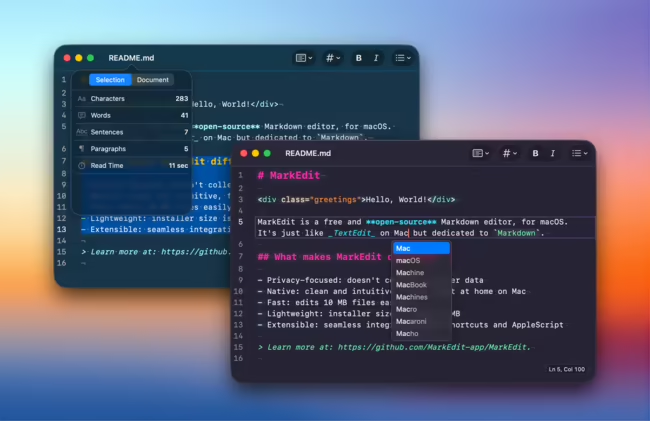
Speed is a virtue of a static site, since the server computes nothing during a visit and merely sends a ready file. Good scores in tools such as Lighthouse reflect that, as does a smoother experience, particularly on phones. Developers appreciate it as well: the whole site is a set of files that are easy to move, copy and rebuild.
Security, however, is the greatest strength. With no database, login panel or publicly reachable PHP scripts on the server, most common break-in routes vanish. Nor is there any need to keep updating plugins or the WordPress core, which for an ordinary business website translates into less work and less risk.
Weaknesses and limits
What a static site lacks is WordPress's modularity. Installing a plugin does not add features with one click; they must be planned and built. SEO is included in that: in WordPress plugins handle many settings, while a static site needs them handled separately. Running the site depends heavily on the developer's skills, and publishing changes can be complicated.
Matters that are obvious in WordPress, such as site search, comments, contact forms or configurable sliders, must be planned precisely in advance on a static site, and both building them and managing their content later is harder. Hosting may even cost nothing, since Netlify, Cloudflare Pages, GitHub Pages and Vercel all have plans for static sites, yet getting it set up takes longer. Redirects and URL handling have to be configured, whereas on ordinary PHP hosting this happens almost by itself.
Consequently, simple tasks such as publishing a downloadable file or adding a page can take longer and need a more experienced developer. Non-technical people will not find static sites as friendly as WordPress. But there also poorly configured WordPress sites can be so messy that, regardless of the admin's skills, content debt inevitably degrades performance, SEO, and site structure (e.g., mixing products with CMS pages or shop categories with blog tags, published test pages, duplicated pages).
What to choose
Small business websites, portfolios and single-offer pages that change rarely and where speed and freedom from updates matter most are where a static site generator fits. BeGiga designs and builds such sites, as well as product catalogues, as part of its system design and websites service. WordPress stays the better option when several non-technical people publish consistently and regularly, when the site needs many off-the-shelf features from plugins, or when a large site already runs and moving it would be costly.
Frequently asked questions: WordPress
Is a static site better for SEO than WordPress?
Not automatically. A static site is usually faster, which helps, but rankings depend mainly on content and correct settings. In WordPress plugins handle many of those settings, while on a static site they have to be prepared separately, such as meta tags and a sitemap.
Can the owner of a static site edit its content?
Yes, but usually differently than in WordPress. Content lives in simple text files that can be edited in an ordinary editor. Publishing changes can be harder for non-technical people, though, and often needs a developer or a simple panel built for that site.
How much does hosting a static site cost?
Often nothing or very little. Several large services, such as Netlify, Cloudflare Pages, GitHub Pages and Vercel, offer free plans for static sites. Their terms change, so check current limits before choosing.
- WordPress
- Static sites
- Business website
- Security